
0.29.0: A clearer workspace for your session
Keep turn controls, character notes and conditions close at hand, switch between claimed characters, and align your map grid with manual guides.
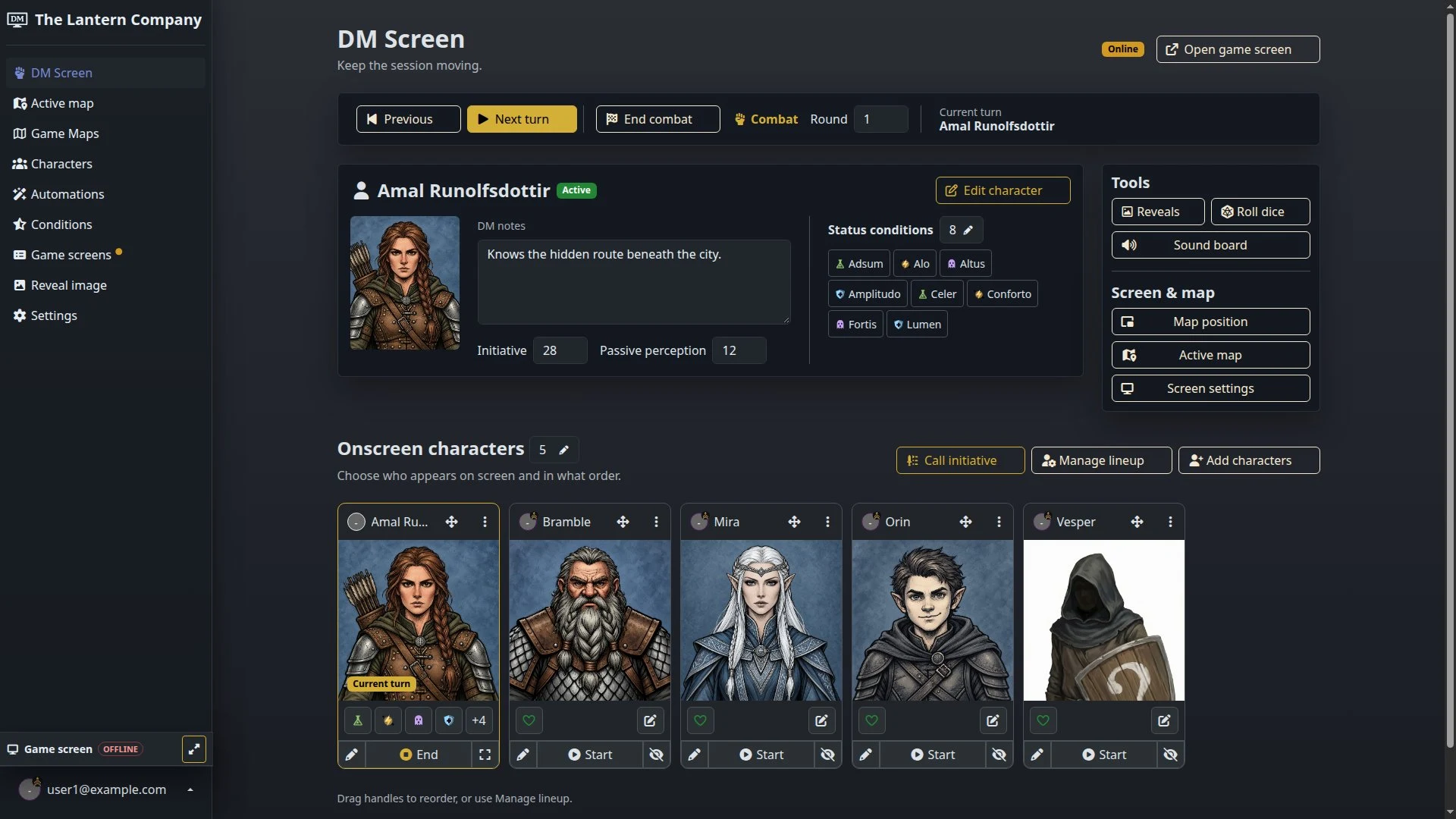
Your next turn, character notes and status conditions now share a clearer workspace. Released today, dm-screen.com 0.29.0 brings compact session controls, labeled tools and a horizontal portrait roster to the DM and player screens.
Keep the active character close
During combat, the DM screen puts the active character’s notes, initiative and conditions together, with turn controls above and the rest of the lineup below. Reveals, dice and sound tools sit alongside the character workspace. On a phone, the panels stack and the roster scrolls sideways.
Players who have claimed more than one character can switch between them from the player screen. The selection and claim dialog keeps those choices together, and the browser remembers the selected character for each campaign. That selection is limited to characters the player has claimed.
Get ready before Round 1
Outside combat, the DM screen now walks you through setting the scene, creating characters, building the onscreen lineup and connecting a game screen. Each step links to the relevant control, and the next unfinished step gets a direct action. Once all four are ready, you can call initiative.
Combat starts at Round 1. At the end of the lineup, Next round advances the encounter, including when there’s only one combatant. Turn feedback stays visible until the new turn appears, and repeated submissions for the same turn are ignored.
The animated game-screen lineup is now the default. Live updates refresh changed characters without rebuilding the unchanged lineup, and focused portraits stay centered when an update arrives during turn-order scrolling. Player-screen condition tiles also refresh when conditions change, including for visible NPCs.
Line up the grid with your map
Map-grid detection now runs in your browser after you create a map or replace its image. The settings include Auto detect grid for another attempt. If the artwork needs a manual adjustment, use two vertical guides and a matching horizontal pair to align the grid. The toolbar shows whether the grid is enabled, any detection warnings and a toggle for the overlay.
The legacy map editor also gains grouped tools, layer duplication, undo and redo, and a remembered autosave switch. With autosave off, an unsaved-change count and an explicit save action help you keep track of your edits. Changing a grid that already has layers prompts a warning first.
For the setup behind these controls, see the maps and fog guide.
Keep your place while the table changes
Shared campaign updates now arrive in place, preserving open dialogs, unsaved forms, map canvases and playing media. Forms show submission progress, character-token portraits stay visible during game-screen refreshes, and fog brush changes appear immediately while you’re editing. The player display keeps its fog fade.
Open your campaigns and head to the DM screen to prepare your next encounter.